utexas.edu
DocuSign home

Main navigation

  • Login to DocuSign
  • About
  • Getting Started More Getting Started pages
    • FAQs
    • Best Practices
    • Video Tutorials
    • Signer Setup Guide
  • Updates
  • Contact
DocuSign home

Breadcrumb

  • Home
  • Getting Started with DocuSign
  • FAQs
  • Sign a DocuSign Document

Sign a DocuSign Document

DocuSign offers the ability for recipients to sign documents with or without DocuSign accounts. Signing in either fashion is quite simple, in both cases the signer will receive a notification via email:
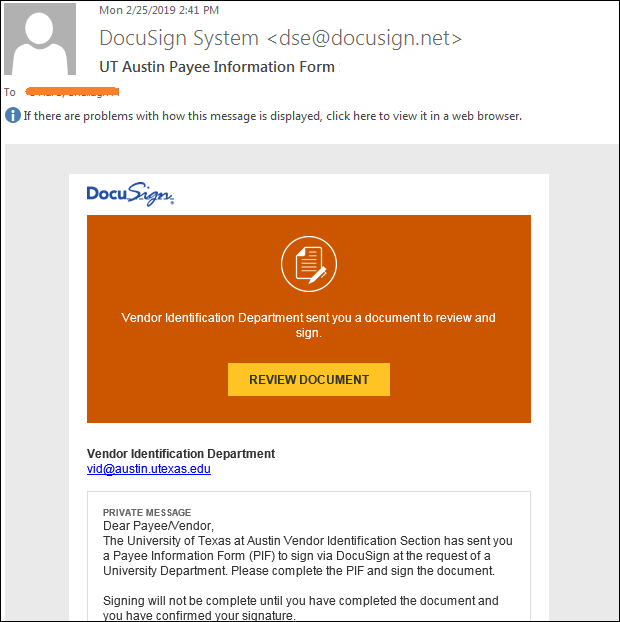
Email Notification


For information on how to sign a DocuSign document you received please see the UT-specific video DocuSign: How to Sign a Document and the vendor documentation, How Do I Sign A DocuSign Document? 

FAQs

  • DocuSign for University Business
  • Guidance for Using DocuSign to Conduct University Business Remotely
  • Create a UT DocuSign Account
  • Sign a DocuSign Document
  • Create and send documents via DocuSign
  • Initiate a document workflow with another unit
  • University Forms
  • Send automatically generated documents through DocuSign for signature
  • Retention for DocuSign Documents
  • Forwarding Sender's Documents to Box
  • Comply with DocuSign, as a UT employee
  • User Profile Management
  • DocuSign Mobile App
  • Manage Email Notifications
  • Use Reporting Features
  • System Requirements & Supported File Types
DocuSign home
Find us on Facebook
Find us on Instagram
Find us on Linkedin
Find us on Twitter
Find us on Youtube

110 Inner Campus Dr., Stop K5400
Austin, Texas 78712
Phone: 512-471-9296
rims@austin.utexas.edu

Footer menu

  • Contact DocuSign Support at rims@austin.utexas.edu
  • Records & Information Management Services
  • UT Directory
  • Handbook of Business Procedures
  • IT@UT
  • Sitemap
© The University of Texas at Austin 2026
Emergency Information Site Policies Web Accessibility Policy Web Privacy Policy